Role
Process
Output
Placeholder copy often looks harmless, but in reality it drives the entire product conversation. Early mockups almost always started with placeholder text mostly because design needed to move fast. But when those placeholders drifted from our communication guidelines or were based on outdated user insights, they unintentionally shaped how stakeholders understood the product.
This becomes even more crucial when building products for public services, where stakeholders often have limited technical familiarity and the domain is highly regulated or complex. Stakeholders don’t really care whether a mockup is “still a draft”—they want to picture the final experience. And the most universally understandable, highly visible element is always the copy.
A well-written placeholder copy helps everyone stay aligned:
• discussions run smoother because concepts are clearer
• feedback becomes more strategic rather than nitpicking words
• conversations stay focused on real issues
• teams gain clarity earlier on the big picture
You see, a lot of things depend on good placeholders. But placeholder copy is only one part of what content designers do.
They shape narrative structure, ensure compliance with legal guidelines, maintain consistency across flows, and contribute to strategic decision-making, all while handling multiple projects at once. In that reality, spending a disproportionate amount of time fixing inherited placeholders is simply not efficient.
Designers can use AI writing assistants—but only to an extent. Even with Ketik GPT, our internal custom GPT built specifically to support context-specific writing tasks, designers still had to go through a long sequence: screenshot the mockup, describe the context manually, wait for output, refine it, and paste it back into each layer. The gap between writing assistance and design execution was still wide. And we wanted to remove that friction.
So we asked a simple question: What if designers could get guideline-aligned placeholder copy directly inside the mockup—without switching tools or copy-pasting?
That question led us to build Pensil Ajaib.
Pensil Ajaib is a Figma plugin designed specifically to help designers review and generate better placeholder copy directly inside their mockups. It uses our internal copy guidelines stored in a GitHub repository as its brain, referencing structured rules including glossary terms, tone and style guidance, audience-specific execution rules, UI component patterns, and example libraries. Unlike generic AI generators, Pensil Ajaib applies context-aware logic. It reads the product context, audience, and component type before proposing placeholder text that follows the guideline.
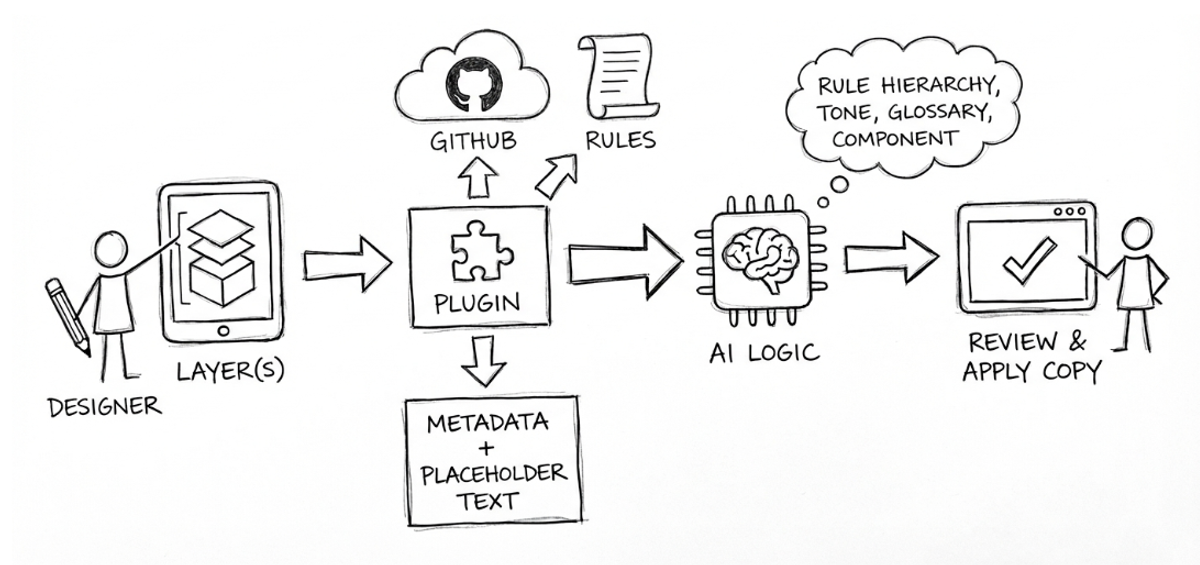
Pensil Ajaib is not meant to replace writers. It gives designers a stronger starting point so content designers can review a cleaner, more aligned draft—allowing the workflow to move more efficiently.
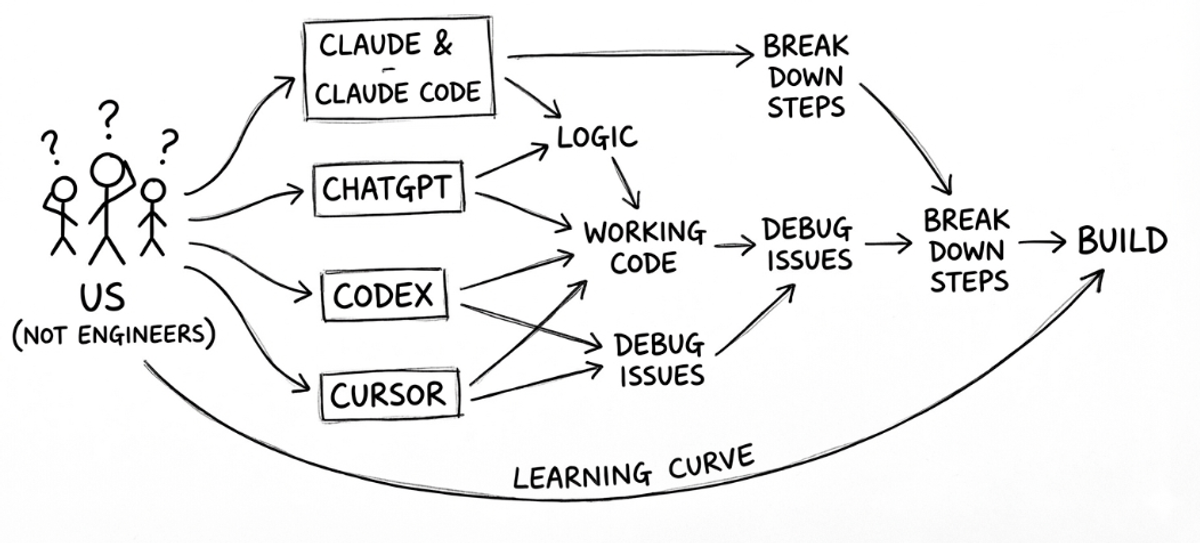
Now that we knew what we wanted to build, one big problem became obvious: none of us are engineers — we don’t know how to code.
Tools like Claude, Claude Code, ChatGPT, Codex, and Cursor became our “engineering partners,” helping us translate logic into working code, debug issues we didn’t understand, and break down complex steps into something we could actually learn. There was definitely a learning curve. But instead of being blocked by our lack of technical expertise, we chose to leverage AI and give it a try.
Pensil Ajaib is the result of two core disciplines working together: content systems design and AI-driven logic design.
On the content side, we consolidated everything a content designer would need to craft messages into a comprehensive GitHub guideline. This includes technical rules, glossary terms, tone and voice guidance, audience behaviors, motivational triggers, and nuanced insights that shape what we say and how we say it.
But knowledge alone wasn’t enough. The plugin needed a structure it could reliably read. We reorganized the guidelines into modular Markdown files for easier maintenance, assigning IDs to glossary entries for clarity, defining execution rules per audience, and cataloging UI components with clear specifications.
We experimented with multiple folder structures —varying depth, category groupings, and naming conventions— before settling on a format that balances machine readability with long-term maintainability. The result is a predictable, scalable repository that both humans and AI can navigate intuitively.
Once the content structure was stable, we built the logic that allows the plugin to interpret context and make decisions like a content designer.
This includes:
Stitching these layers of logic together was the hardest part. We tested, debugged, and optimized continuously so that Pensil Ajaib could mimic the decision-making patterns of real content designers in determining what to analyze, what to prioritize, and what requires additional user context.
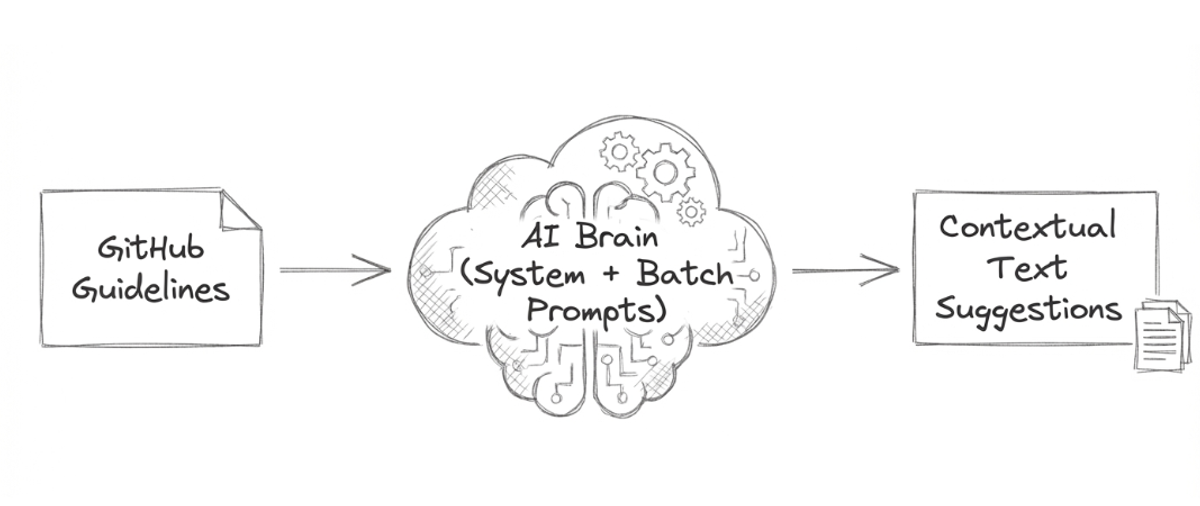
Together, these components ensure that Pensil Ajaib doesn’t just fill text. It interprets context and applies the right rules at the right moment.
Because our goal was to minimize friction, we intentionally designed a simple, natural workflow.
The plugin asks users to choose their product and audience, then select the scope of the improvement: a single layer, multiple layers, or a full frame. Designers may optionally add extra context, similar to how they naturally interact with AI tools.
Pensil Ajaib then reads layer names and placeholder text to infer the component type, retrieves the relevant rules from the GitHub repository. It then produces three aligned variations along with a brief rationale summarizes why the suggestions look the way they do, helping designers choose confidently.
Designers can then choose to Apply, Regenerate, or Apply All. That’s it.
We deliberately removed anything that added cognitive load or slowed down iteration cycles. This minimal flow keeps designers focused on designing not managing a tool.
The workflow is significantly more efficient compared to using a separate platform to review the copy. Instead of going through a six-step cycle: screenshot Figma → type context → iterate → copy final output → paste back into Figma -> adjust formatting, designers can now complete the process in three steps: click a layer -> review suggestions -> apply.
It also creates a healthier division of labor: designers can move quickly with credible placeholders, while writers focus on higher-impact work such as refining narrative, shaping structure, and ensuring nuance and clarity across flows.
More importantly, with cleaner placeholders from the start, design discussions move faster. Teams can spot deeper product or UX issues earlier rather than being distracted by copy inconsistencies. This also makes it easier to align with engineering sooner and focus on addressing structural or interaction-level decisions.
And in the context of public services, this impact becomes even more crucial. Clear placeholders help stakeholders—many of whom have limited technical familiarity—quickly understand intent and flow. Misaligned or outdated placeholders can create misunderstandings that ripple across product, policy, and operational teams. With Pensil Ajaib, clarity arrives earlier in the process, long before decisions become costly to change.
Pensil Ajaib wasn’t built by engineers. It was built by product and content designers who used AI tools to bridge technical gaps. Any organization with a clear communication guideline system can replicate a similar workflow using modular documentation, AI-driven logic, and lightweight plugin architecture.
Looking back, the hardest part wasn’t the coding—it was translating instinctive human judgment into rules that a system could apply consistently across different UI contexts. We had to decide which principles must always be enforced, which ones could flex depending on the scenario, and how much explanation to provide without slowing designers down. Getting that balance right took multiple rounds of testing and refinement.
Pensil Ajaib will continue to evolve. We have a long backlog—from improving layer-name heuristics, to building analytics for usage patterns, to designing feedback loops that allow writers to refine guidelines based on real-world usage. But for now, we’re simply glad we were able to build something that solves a real problem in our workflow.
And we hope it sparks ideas for you too—so you can create your own tools, shaped by your own challenges, your own users, and your own environment.